 GuestLog in
 GuestLog in
Final Fantasy V Advance Music Player names fix
Original game : Final Fantasy V Advance
Platform : GBA
Author : Mateo
Release date : 09 June 2022
Category : Bug Fix
Patch version : Final
Modifications : T
Downloads : 347
ROM Information
Database match: Final Fantasy V Advance (USA)Hack description
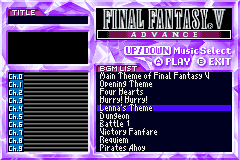
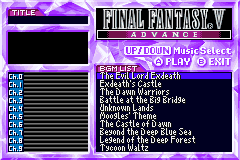
For some strange reason, Square Enix used the names from the PS1 translation for Lenna (Reina) and Exdeath (X-Death) in Final Fantasy V Advance's Music Player only. These names are only used there and are inconsistent with the names used in the rest of the game, which uses the names from the GBA translation. It's also worth noting that Reina is actually a mistranslation (レナ in katakana can be Romanized as Lenna/Lena/Renna/Rena, while レイナ can be Romanized as Reina (notice the extra i/イ)).Screenshots
Contributions
| Contributor | Type of contribution | Description |
|---|---|---|
| Mateo | Hacking |
Reviews
| Makes the music player look less weird. | T29 | 2022-06-10 | Version Final |
I remember the day when I beat the game and entered the music player only to find a song called "Reina's theme". This patch fixes that, so I recommend it. | |||