 GuestLog in
 GuestLog in
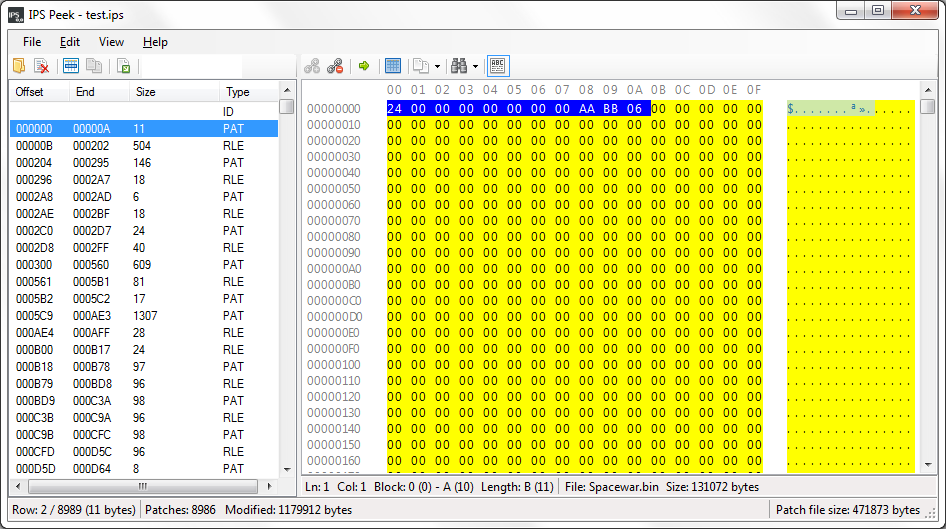
IPS Peek
Game : N/A
Platform : Not Applicable
Author : VectorMan
Release date : 10 Feb 2015
Category : Patching
OS : Windows
Skill Level : Intermediate
Version : 0.6.0
Downloads : 5448
Utility description
IPS Peek is an IPS patch analysis tool for Microsoft Windows.Reviews
| Useful for version control | Miksy91 | 2018-10-11 | Version 0.6.0 |
I have been working on an extensive rom hack based on a binary rom file, and this tool has been exceptionally useful for validating, that I don't accidentally cause unwanted changes (a.k.a "bugs") to the rom file. My hacking process is such that every time I start working on the hack, I have a backup of the hack at its current state. Once I have done some changes to the hack rom file, I'll create an ips patch between the backup, and the hack at its current state. Next, I review the contents of that ips patch with this tool. If the contents seem valid, and there are no unwanted changes, I "accept" the changes. This means that I archive the copy with a version, and create a new copy of the hack file as its current state. If there however are changes that I don't recognize or seem invalid, I'll check, what the data in those parts of the rom file used to be in the backup. If the contents in backup are correct, I fix them in the main hack rom file, and create another patch, and re-validate its contents. | |||
| Great tool for organization | Corvo | 2015-02-13 | Version 0.6.0 |
I've used this tool mainly for the Selective Patching option. Thanks to this, it became a lot easier to produce partial patches for beta-testers. Since the developer updates regularly, this tool shows a lot of promise. | |||