 GuestLog in
 GuestLog in
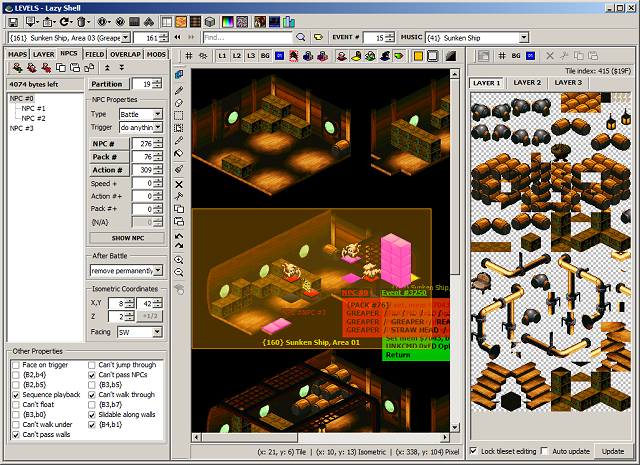
Lazy Shell - Super Mario RPG Editor
Game : Super Mario RPG: Legend of the Seven Stars
Platform : Super Nintendo
Author : giangurgolo & Omega
Release date : 22 Jan 2014
Category : Game Specific
OS : Windows
Skill Level : Advanced
Version : 3.19.0
Downloads : 10108
Utility description
Lazy Shell is a third party .NET application written in the C# programming language which is capable of editing a wide range of elements within the Super Mario RPG (US) ROM image file.Reviews
| A wonderful editor. | Elementalpowerstar | 2011-06-17 | - |
Version to review: 3.6. The Lazy Shell editor edits nearly every non-hardcoded aspect of Super Mario RPG: Legend of the Seven Stars. While everyone being incredibly discouraged by the difficulty curve of learning Lazy Shell, the effort put into learning the ins-and-outs of the system and editor itself are well worth the days of experimenting and trial-and-error that it takes to learn. Everything from level maps to monster stats, it's all here. Everything that the game has to offer can be modified in a way that can create a simple recolor hack to a brand new adventure staring Mario and his friends. (Or a new character if you decide to put the time and effort to creating a bunch of sprites.) The generally clean, if not slightly cluttered, user interface makes showing every bit and byte that is relevant to the current screen all in one place, with helpful tips and explanations on what exactly Mortality Protection or what a VRAM Partition is. Coupled with the handy Hex to Dec and Dec to Hex option to show what a some numbers mean in the game itself, which comes out incredibly helpful if you're looking through the blank named Attacks in the Battle Scripts editor, and have a notepad window open with all of them to the side. One great feature that's constantly throughout the editor is the import and export features, able to export just about any data in the game, from palettes to the BPP images the game uses, and being able to import them back into the game after any additions are made. The editor will try to convert the image back into the palette's range. If you're going to try this for the first time, try using the Title Screen's Layer 3 image for this, being the "SUPER MARIO RPG: Legend of the Seven Stars by Nitnendo/Square" etc image on the title screen. The editor even splits up the imported title screen into manageable 8x8 tiles so it's a little easier on the game to render, and doesn't take up as much space in the game itself, something I learned that was crucial for big images being imported into Super Mario World. The editor also has a patching service that can patch a certain game from an HTTP server, which users can make their own servers on websites to host patches of their games or improvements to be patched directly to an unedited ROM image. Omega created a thread on a different forum that details on how to submit their hack to their patch service server, called Cirrus, however, I believe giangurgolo is working solo on the editor now, and his patch service is located on his Comcast website, so I'm unsure if giangurgolo is still allowing hackers to submit their patches to the server for user download. Two great features in this editor are the Notes section, and the Preview ROM function, which allow the editor to load up a certain monster formation or level map to see if a monster's battle script works as it was intended to, say, if Monster 1 was supposed to summon Monsters 2 and 3 if hit with a Fire attack, you could test to see if it does that exactly. If not, you can go back and see why it doesn't. An addition in recent versions is the abillity to change levels of the party members, on an individual basis, who's in your party for that preview, and what equips that party member has for that battle. The Notes section of the editor lets you keep organized notes about a lot of aspects of the editor, on an index basis, if you choose to. Notes can be a great way to tell what bits are set where and when not to touch them, or just writing down what you did that day, and what you need to do the next time you start hacking again. This has been helpful numerous times. You'll really have to pick up the editor yourself, and see exactly what's in the editor. It's a great utility if you take the time it takes to learn it. | |||